



Ellevation Quick Start Guide
Connect trustworthy English learner data to coordinated program decisions, classroom support, required documentation, and sustained monitoring.
Ellevation is an educator-facing English language development and program-management environment. It can bring student information, workflows, reports, instructional strategies, professional learning, and selected assessment insights into one workspace. The district still governs the official records, locally approved criteria, staff responsibilities, and final decisions.
Use One Workspace Across the English Learner Program
Govern
Name the authoritative source, data owner, user role, update schedule, and correction route for every critical field.
Understand
Give educators current student profiles, language-domain information, program history, goals, and assigned work.
Act
Use evidence to plan instruction, complete workflows, consult families, provide support, and monitor progress.
Document
Record who reviewed the evidence, what was decided, where the official update occurred, and what happens next.
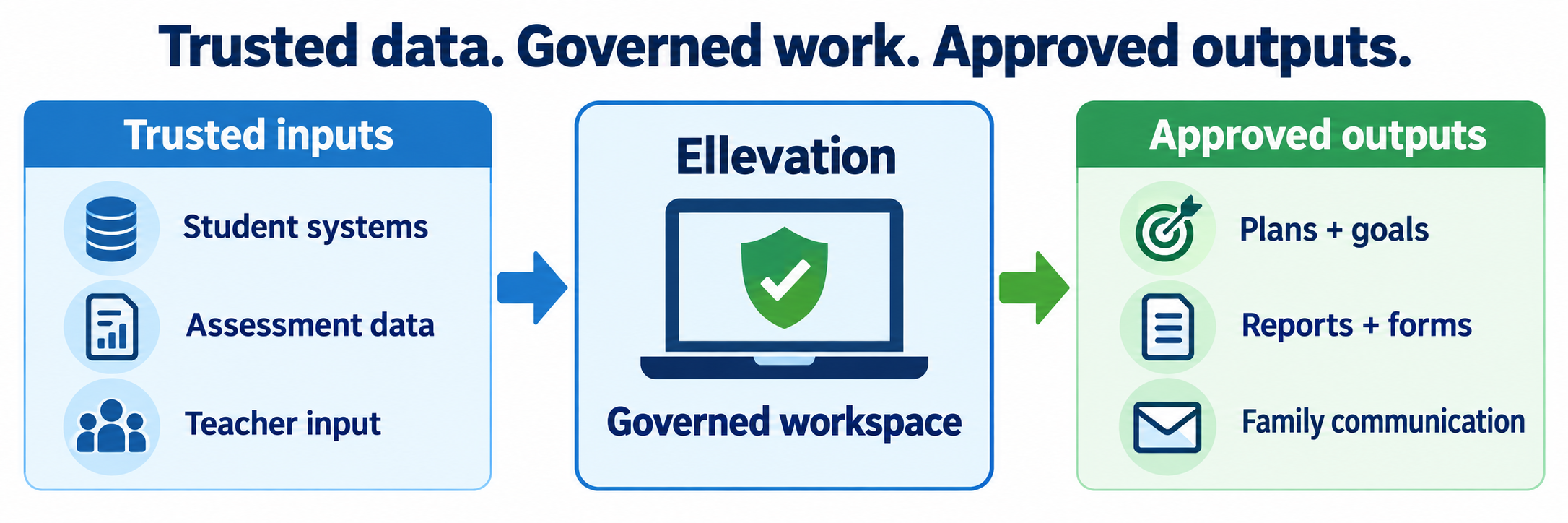
A dashboard is a decision-support view. It may reveal a student who needs attention or appears ready for a workflow. Verify the underlying records and complete the district’s approved process before changing services or official status.
Identify the Licensed Ellevation Components
| Component | Primary purpose | Typical interaction |
|---|---|---|
| Ellevation Platform | Student profiles, data views, goals, program workflows, monitoring, reports, and collaboration | District leaders, administrators, specialists, counselors, and teachers review and act on authorized information. |
| Forms | Configurable collection and approval workflows for plans, teacher input, reclassification, monitoring, and local documentation | Assigned educators complete tasks; coordinators monitor status, review evidence, and follow up. |
| Ellevation Strategies | Professional-learning modules and more than 100 research-based classroom activities | Teachers learn, select, adapt, and facilitate strategies within grade-level content instruction. |
| Family Communication | Digital family letters, translated communication, responses, signatures, and status tracking | Availability and local approval vary; districts verify recipients, language, content, delivery, response, and retained record. |
| Ellevation Benchmark | Short language-proficiency checkpoints across reading, writing, listening, and speaking | This is student-facing when purchased and activated; confirm current availability, roster, login, administration, and reporting. |
| Ellevation Math | Academic-language support connected to mathematics | Where still licensed, teachers use primers, language routines, and confidence questions with students. |
District Data and Setup
Build a reliable data and permissions environment before assigning forms or asking educators to use dashboards.
Inventory the implementation
Document the licensed modules, schools, grades, student populations, administrator structure, user roles, contract dates, support contacts, professional learning, data feeds, assessment sources, forms, reports, family communications, and any student-facing products. Confirm which features are active rather than assuming every item on the public product site is included.
Map every authoritative source
| Information | Likely authoritative source | Ellevation role |
|---|---|---|
| Student identity, enrollment, school, grade, courses, and teachers | District SIS and scheduling system | Organize imported records into authorized student profiles, lists, assignments, and views. |
| Initial and Summative ELPAC results | TOMS, CALPADS, and validated district records | Display language proficiency and domain information for analysis and workflow use. |
| English Language Acquisition Status and status date | District SIS and CALPADS reporting process | Support review and documentation; the district records the approved official change. |
| Local assessments, grades, attendance, services, and program participation | District-designated systems | Combine selected evidence for monitoring, planning, and reporting. |
| Teacher evaluation, goals, notes, and monitoring evidence | Locally approved process and completed educator records | Distribute, collect, track, organize, and retain authorized workflow evidence. |
Resolve conflicts at the source. Editing a downstream display does not reliably repair the SIS, TOMS, CALPADS, assessment, or scheduling record that may overwrite it during the next import.
Design and validate the data exchange
- Use stable student, staff, school, course, and section identifiers.
- Document each file or connection, included population, field transformation, schedule, owner, and failure alert.
- Reconcile counts by school, grade, ELAS, program, assessment year, and teacher assignment.
- Test new, transferring, withdrawn, duplicate, missing-ID, dually identified, and recently reclassified students.
- Define how late ELPAC results, corrected records, summer changes, and historical data are reprocessed.
- Keep a dated pre-import and post-import validation record for consequential updates.
Configure sign-in and permissions
Ellevation publicly documents single sign-on through Clever and ClassLink and uses role-based permissions. Authentication establishes identity; imported relationships and permission rules determine which students, sites, dashboards, forms, and reports that user may access.
- Publish one official login route and prevent duplicate local accounts.
- Test district EL leaders, site administrators, EL specialists, general education teachers, counselors, coaches, substitutes, and support staff.
- Confirm whether teachers see current students, assigned forms, historical students, and only the data needed for their role.
- Remove departed staff promptly and review elevated access on a schedule.
- Use approved demonstration records when training staff; avoid exposing real student data unnecessarily.
Configure workflows around local policy
Define form cycles, recipients, due dates, reminders, required evidence, signatures, reviews, approvals, reopen rules, exports, and retention. Align dashboards and candidate lists with current district criteria. Assign an owner who updates configurations when state guidance, local board policy, assessments, thresholds, or staff responsibilities change.
Before launch, complete each workflow as a teacher, reviewer, administrator, and demonstration student where applicable. Verify that an incomplete form cannot appear complete, a prior-year response is not mistaken for current evidence, and an approval reaches the staff member responsible for the official update.
Prepare annual rollover and support
Preserve required records, close or archive completed cycles as directed, refresh schools and roles, remove obsolete access, load new enrollment and schedules, reconcile continuing EL and RFEP populations, and test new-year dashboards before distributing work. Publish a support route that distinguishes login, missing-student, incorrect-data, workflow, policy, and instructional questions.
Teacher Access and Instruction
Use student information to plan appropriate language support within rigorous grade-level instruction.
Enter through the approved route
Use the district’s Ellevation link, Clever portal, or ClassLink launch. Confirm the correct school, current classes or student groups, assigned tasks, and role. Report a missing student or class through the district data-support route rather than creating another identity or maintaining a private duplicate list.
Read the profile as a whole
Review language background, ELAS and program history, ELPAC overall and domain results, goals, services, prior supports, classroom evidence, grades, attendance, and locally selected measures as authorized. Check dates and source labels so an old score or incomplete import is not treated as a current need.
Describe strengths before needs. Language proficiency is one part of the student’s learning profile. It is not a measure of intelligence, motivation, home-language value, content knowledge, or potential.
Translate information into a language objective
Begin with the grade-level content objective. Identify the listening, speaking, reading, or writing students will need to demonstrate understanding. Then choose a clear language objective and the support that gives students meaningful access without reducing the intellectual demand.
| Plan | Teacher question | Possible action |
|---|---|---|
| Content objective | What grade-level idea or practice will students learn? | Keep the intended content, text, problem, investigation, or source visible. |
| Language demand | How must students receive and express meaning? | Name the required language function, form, vocabulary, and interaction. |
| Evidence-informed support | Which current strength can help the student meet that demand? | Use visuals, modeling, structured conversation, sentence support, background building, or strategic grouping. |
| Evidence of learning | What will show both content understanding and developing language? | Collect talk, writing, annotations, models, explanations, or a short performance. |
Use Strategies as teacher-led practice
Ellevation Strategies combines professional-learning modules with research-based classroom activities. Learn the activity, select a version appropriate to the proficiency range and lesson, prepare its materials, model the routine, facilitate student interaction, and reflect on the evidence. Students participate in the classroom activity; Strategies is not simply an independent digital curriculum assigned to each student.
- Choose one strategy that fits an immediate lesson rather than browsing without a purpose.
- Adapt names, examples, texts, visuals, and grouping to the local class.
- Plan wait time and repeated opportunities to rehearse, clarify, strengthen, and share ideas.
- Use the strategy with all students when it improves access and academic discourse.
- Return to the dashboard or profile only when new evidence will change instruction.
Complete assigned forms with evidence
Open the student and reporting period named in the task. Use current observations, work samples, assessments, grades, participation, and intervention evidence defined by the district. Distinguish direct observation from inference, describe the support provided and student response, save carefully, and confirm the final submit action.
- Check student, school year, cycle, course, and due date before entering information.
- Use specific evidence rather than general impressions.
- Document concerns early enough for the support team to respond.
- Do not duplicate confidential records in personal spreadsheets or email.
- Confirm whether submission locks the form or whether a reviewer can return it.
Collaborate and follow through
Bring relevant Ellevation evidence to grade-level, department, ELD, MTSS, counseling, or student-support meetings. Agree on the responsible person, classroom action, progress measure, review date, and documentation location. A completed form closes an administrative task; instructional support continues until evidence shows that the need has been addressed.
California Reclassification and RFEP Monitoring
Use Ellevation to coordinate evidence and work while preserving the LEA’s decision authority and official reporting responsibilities.
Use all four reclassification criteria
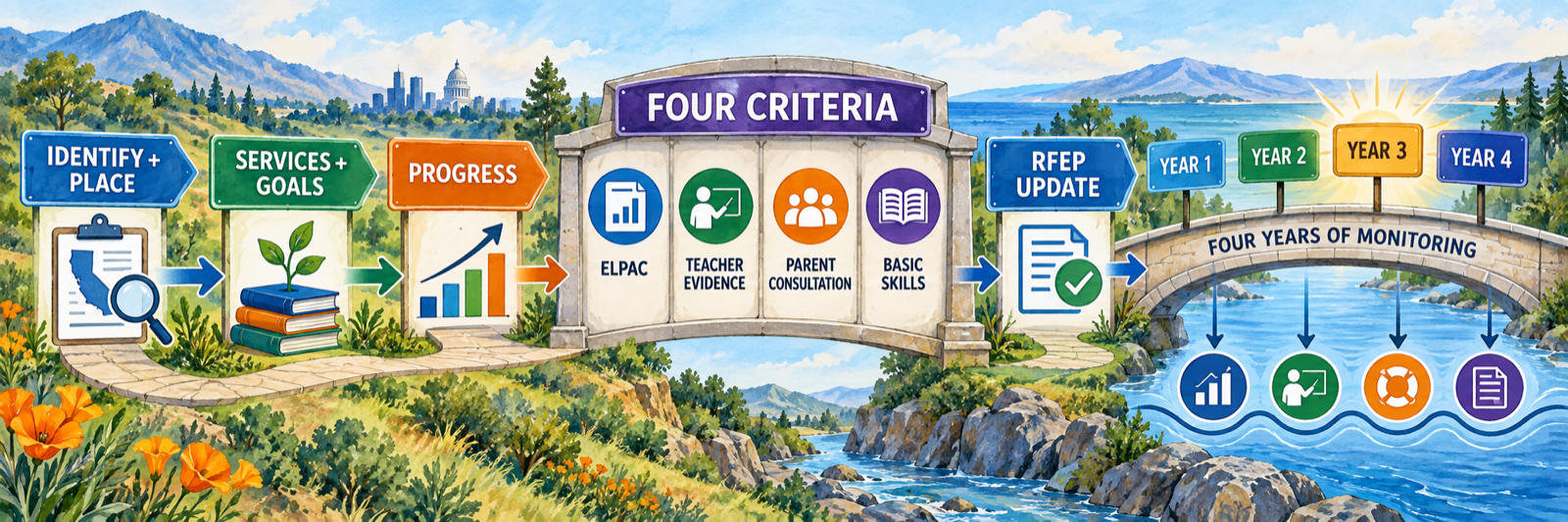
California LEAs must use four criteria in their locally approved process: an objective assessment of English language proficiency; teacher evaluation based on evidence, including curriculum mastery; parent opinion and consultation; and comparison of basic-skills performance with an empirically established range for English-proficient students of the same age.
For the statewide English-proficiency criterion, current CDE guidance identifies Summative ELPAC Overall Performance Level 4 or Summative Alternate ELPAC Overall Performance Level 3. The LEA locally defines and consistently applies the teacher-evaluation, consultation, and basic-skills portions within state requirements.
Treat candidate lists as a starting point
Configure Ellevation criteria and candidate views to match current local policy. Then validate the source, date, completeness, and threshold of every required measure. Include all teachers and certificated staff with direct responsibility for instruction or placement when gathering teacher evaluation evidence, as appropriate to the district process.
Teacher evaluation is evidence, not a popularity vote. CDE states that teacher evaluation should be based on data and the LEA’s established process rather than interpreted as a general teacher opinion.
Complete parent opinion and consultation
Use the district’s approved language-accessible process to explain the evidence, invite questions, seek parent or guardian opinion, and document the consultation before the decision. California requires opinion and consultation; parental consent is not required for reclassification. Confirm that any Ellevation letter or digital communication uses the correct recipient, home language, approved content, delivery route, response status, and retained record.
Record the approved decision in official systems
After the LEA confirms that all four criteria are met, follow local approval and record-retention procedures. Update the student’s official ELAS and RFEP start date through the district’s SIS and CALPADS process, then confirm the new status returns to Ellevation. Reconcile the Ellevation form, SIS record, CALPADS result, student services, family notification, and cumulative documentation.
Monitor RFEP students for at least four years
California requires LEAs to monitor students for at least four years after they exit EL status. The monitoring system should show whether students participate meaningfully in the standard instructional program, whether premature exit is a concern, and whether academic deficits associated with learning English have been remedied. When evidence shows insufficient progress, provide appropriate intervention and support and continue until the need is resolved.
Year 3 example: review, support, and document

| Review | Look for | Respond |
|---|---|---|
| Current academic evidence | Grade-level reading, writing, mathematics, course grades, local and state measures, and progress across time | Confirm expected progress or identify a specific academic area requiring support. |
| Classroom participation | Comprehension, discussion, explanation, independent work, attendance, and access to instruction | Continue effective universal supports or add a focused response tied to evidence. |
| Comparison and context | Performance relative to appropriate peers, opportunity to learn, mobility, disability, and other relevant factors | Avoid attributing every difficulty to prior EL status; involve the appropriate support team. |
| Follow-through | Responsible person, intervention, progress measure, family communication, and review date | Document completion and continue support until the identified deficit is remedied. |
Resolve the Failed Layer
| What you notice | Check first |
|---|---|
| The teacher can sign in but sees no students | Current teacher-course relationships, included population, data refresh, school assignment, and role permissions. |
| A student appears twice | Stable identifiers, duplicate SIS records, merge history, prior district identity, and import matching rule. |
| An ELPAC score is missing or old | Assessment year, TOMS/CALPADS availability, district acquisition, load date, rejected record, and student match. |
| A form went to the wrong teacher | Course tags, assigned staff, reporting-period logic, teacher-of-record data, workflow rule, and refresh timing. |
| A candidate list differs from the district list | Local criteria version, thresholds, source measures, dates, exclusions, missing values, and refresh schedule. |
| A completed workflow did not change ELAS | Approval status, responsible SIS/CALPADS staff member, official update procedure, validation result, and return feed. |
| A family letter has no response | Recipient, address or email, home language, delivery status, alternate contact method, follow-up owner, and documentation. |
| An RFEP student needs support | Specific evidence, comparison group, prior supports, intervention route, responsible team, progress measure, and review date. |
Good Ellevation Habits
Name the source
Show where every field originated, when it was refreshed, who owns it, and how it is corrected.
Use the whole profile
Combine language information with strengths, current classroom work, content learning, history, and context.
Act on evidence
Turn forms and dashboards into a named support, responsible person, progress measure, and follow-up date.
Close the loop
Confirm the approved decision, official record, family communication, retained evidence, and next monitoring cycle.
Official Ellevation and California Resources
Use current product documentation, CDE guidance, and the district’s approved policies and configuration.
2026–27 edition. Public Ellevation product, instruction, security, and update pages and current California Department of Education reclassification, RFEP monitoring, and CALPADS resources reviewed September 12, 2026. Product components, data feeds, forms, permissions, student-facing tools, assessment access, family communication, and interfaces depend on the active district agreement and configuration. Ellevation supports program work; each LEA remains responsible for locally approved decisions, official records, required notices, data quality, and compliance. No district-usage count is stated. Classroom examples and conceptual illustrations are SDLA material.