



Education Copilot Quick Start Guide
Use a broad AI teacher toolkit efficiently while matching each task to the privacy, professional review, and district authorization it requires.
Education Copilot is primarily an educator-facing drafting workspace. Its public catalog includes lesson plans, handouts, presentations, rubrics, quizzes, communications, classroom-management tools, grading support, and special-education drafts. These jobs do not carry the same risk. Begin with anonymous instructional drafting; add identifiable or consequential work only when the district has approved the data path and human decision process.
One Toolkit, Different Responsibilities
Describe
Give the tool a grade, subject, standard, topic, time, output format, and instructional need without identifying a student.
Draft
Select the right generator and create a bounded first version rather than treating the toolkit as one general-purpose answer box.
Review
Check facts, sources, standards, rigor, answer quality, accessibility, bias, privacy, copyright, and classroom practicality.
Authorize
Require district approval and qualified team decisions when names, records, grading, disability, behavior, or family communication are involved.
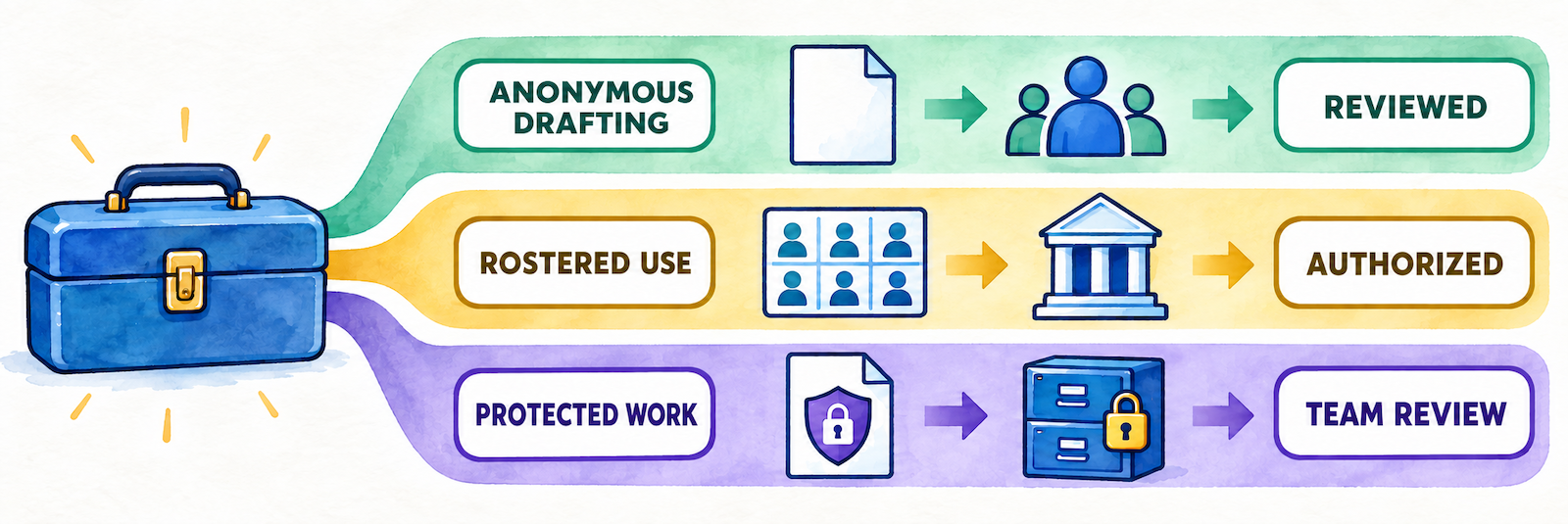
Education Copilot recommends never entering student PII. Follow that as the default. Use anonymous descriptions such as “Grade 8 learners who need chunked directions and vocabulary support” unless an approved district agreement and workflow explicitly permit more.
Classify the Tool Before Using It
| Responsibility lane | Examples | Required posture |
|---|---|---|
| Anonymous instructional drafting | Lesson and unit plans, generic worksheets, quizzes, rubrics, writing prompts, organizers, examples, study guides, public-source analysis, and general differentiation | Use approved sources and anonymous needs; teacher verifies and edits before classroom use. |
| Identifiable classroom operations | Random name picker, group generator, seating chart, student report, parent message, substitute plan with classroom details, and saved class lists | Use only through an approved account and data practice; minimize names and constraints; limit access and retention. |
| Consequential or protected work | Essay grading, report comments, IEP goals, behavior intervention plans, ability-based grouping, accommodations, and individualized feedback | Use authorized data only; preserve authoritative records; require qualified professional or team review; never automate the final decision. |
Select and Govern
Separate the individual subscription a teacher can start today from a district service that would require documented institutional controls.
Identify the actual plan
| Plan | Published access | What remains to verify |
|---|---|---|
| Free | Three core AI templates, lesson plans and handouts, document editing and export, training videos, and community support | Generation limits, exact available tools, output history, storage, account ownership, and whether district email is required |
| Pro | More than ten AI templates, unlimited long-form handouts, auto-save and output history, unlimited storage and use, training, and chat support | Current tool entitlement, export formats, individual ownership, renewal, cancellation, stored history, and movement into a later school plan |
| School or district | The vendor says institutional plans and team pricing are available through direct contact. | Contracted features, administrator console, SSO, provisioning, roster scope, roles, reporting, DPA, AI providers, support, migration, and LMS behavior |
The marketing site may describe more tools than a particular plan provides. Compare the logged-in account with the current agreement rather than using the public catalog count as an entitlement list.
Complete the district-readiness checkpoint
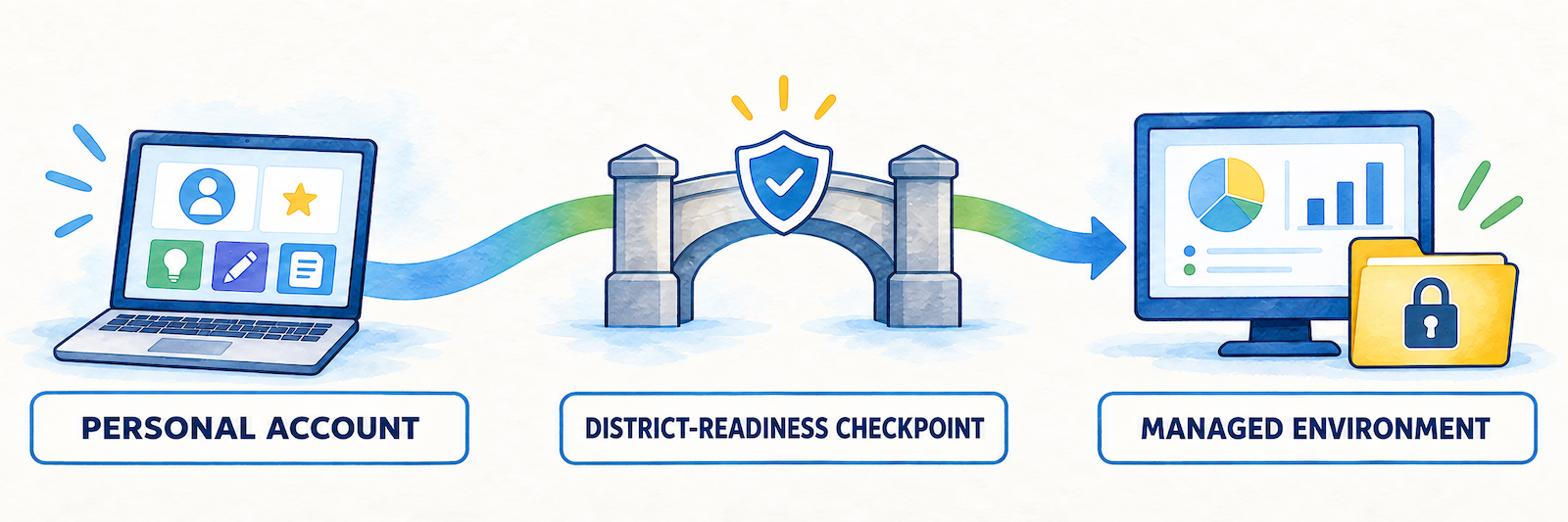
- Contract: What exact tools, limits, support, service expectations, and institutional rights are purchased?
- Identity: Is district SSO supported, through which provider, and how are accounts matched and removed?
- Roster: Are teachers, students, classes, or saved lists provisioned, and from what authoritative source?
- Roles: What can district, school, teacher, support, and student roles view, create, share, export, or delete?
- AI processing: Which models and subprocessors receive prompts, files, outputs, or metadata, and may they retain or train on them?
- Student data: Which data elements and use cases are contractually permitted?
- Lifecycle: Who owns content and data, how are they exported, and when are they deleted after withdrawal or account closure?
- Delivery: Which document, classroom, and LMS connections are supported and what information moves in each direction?
- Migration: Can personal accounts, paid subscriptions, histories, and approved resources move into the managed environment?
Read the published privacy boundaries
The current privacy policy describes account identifiers, location and contact information, device and usage data, social-login information, analytics, service providers, marketing, retention tied to purpose, account deletion requests, international processing, and business transfers. It also says the service does not address anyone under age 13.
- Do not direct students under 13 to create or use accounts under the currently published policy.
- Use a district-managed educator identity. Avoid Facebook, Twitter, LinkedIn, or personal Google authentication for school work.
- Review every requested social-login permission. The policy says authorized social services may expose information such as name, email, activity, or contacts.
- Ask for education-specific contract terms, data-processing documentation, AI-provider details, security evidence, breach procedures, and deletion commitments before approving student data.
- Do not treat “built with student privacy in mind” as a substitute for a completed district review.
Set local tool permissions
Approve tools by responsibility lane. A district may permit anonymous lesson and worksheet drafting while withholding approval for saved rosters, seating constraints, essay grading, student reports, IEP goals, or behavior plans. Publish those distinctions in teacher-facing language and provide an escalation route for uncertain uses.
Pilot the narrowest useful workflow
Use district accounts and public or licensed source material to test one low-data workflow across several grades and subjects. Measure output quality, correction time, accessibility, export behavior, teacher confidence, support response, and whether the final resource improved planning enough to justify broader use.
Generate and Review
Use the dedicated generator as a structured drafting aid, then inspect the complete artifact before it reaches another adult, family, or student.
Choose one defined output
Select a lesson, worksheet, rubric, quiz, slide deck, activity, writing prompt, organizer, study guide, worked example, communication, or another specific tool. Begin with the instructional job rather than browsing the entire catalog. Confirm that the selected tool is available in the current account.
Write a bounded request
| Include | Example |
|---|---|
| Grade, course, and time | Grade 6 science; one 45-minute lesson with a 10-minute exit task. |
| Verified source and standard | Use this district-approved passage and the full text of the selected standard. |
| Learning evidence | Students will explain the relationship using two details from the source. |
| Anonymous access need | Add a vocabulary preview, chunked directions, visual organizer, and optional sentence frames. |
| Format constraints | Two printable pages, readable headings, ample writing space, separate answer key, and no color-dependent directions. |
| Verification cue | Flag facts or source claims the teacher must check rather than inventing a citation. |
Review with a colleague when the stakes rise

| Review | Check |
|---|---|
| Accuracy | Facts, calculations, quotations, vocabulary, examples, diagrams, links, claims, and answer keys |
| Sources and copyright | Source existence, authority, support for the claim, permission to reproduce or adapt, citations, and attribution |
| Standards and rigor | Full standard, learning target, cognitive demand, task evidence, scaffolding, and whether differentiation changed the construct |
| Assessment quality | Directions, item coverage, distractors, scoring, rubric language, answer rationale, accessibility, and opportunities for valid response |
| Context and belonging | Names, examples, histories, cultures, identities, perspectives, assumptions, stereotypes, and local relevance |
| Accessibility | Headings, reading order, contrast, font size, tables, images, alt text, language demand, print quality, and assistive technology |
| Privacy and policy | Prompt, source, stored history, output, filename, sharing, export, retention, academic integrity, and approved account |
| Classroom use | Time, materials, grouping, teacher moves, expected misconceptions, safety, substitute feasibility, and closure |
Use differentiation as a design decision
Describe the barrier and desired support without an identity or diagnosis. Compare the adaptation with the original target. A vocabulary preview, alternate representation, chunked direction, model, sentence frame, extension, or language support should increase access or challenge while preserving the essential thinking unless the student’s approved plan calls for a modified target.
Regenerate only when the request changes
Correct simple problems directly. If the structure is wrong, revise the source, constraint, or requested output and generate again. Every regeneration is a new draft requiring review. Preserve the verified version rather than assuming the newest output is the best one.
Record provenance for shared material
Add a useful title, grade, subject, standard, approved source, creator or reviewer, version date, accessibility note, and editable master location. Remove unused drafts and answer-key copies before publishing to a shared library.
Protect, Decide, and Deliver
Higher-risk tools may provide a useful structure, but they cannot assume a professional role, determine services, or become the authoritative student record.
Keep IEP and behavior work team-based
An IEP goal or behavior-plan generator can suggest a format or anonymous example. The IEP, Section 504, student-study, behavior, or support team must use current evaluation and observation, family and student participation, baseline performance, legal requirements, implementable supports, responsible staff, progress measures, and the authoritative district record.
- Do not paste an existing IEP, evaluation, disability record, incident history, or identifiable behavior narrative into an unapproved account.
- A formal behavior intervention plan ordinarily depends on team analysis and may follow a functional behavior assessment; a generated draft cannot supply missing evidence.
- Check that goals are individualized, measurable, educationally meaningful, and supported by actual baseline information.
- Qualified staff approve and enter the final decision through the district’s established process.
Do not outsource grading or reporting
| Tool | Possible approved use | Human responsibility |
|---|---|---|
| Essay grader | Apply an anonymous sample to test a rubric or surface possible feedback questions. | Read the student’s work, verify evidence, account for task conditions and supports, make the grade decision, and provide meaningful feedback. |
| Student report or report-card comment | Draft a general structure or revise educator-written language without identity. | Use current evidence, describe the correct student, avoid unsupported traits or diagnoses, edit the wording, and enter the official report. |
| Parent message | Draft clear general communication or translate an approved template. | Verify recipient, facts, tone, language, accessibility, confidentiality, required notice, sending system, and retained record. |
| Rubric and assessment | Create a first draft aligned to a defined objective. | Validate construct, items, scoring, answer key, accessibility, bias, security, and appropriate instructional use. |
Treat roster and grouping tools as student data
A saved name list, seating constraint, group rule, ability label, behavior note, or proximity decision can reveal more than a roster. Use only approved minimum information. Do not encode sensitive diagnoses, conflict narratives, discipline, perceived ability, or protected characteristics into a general AI request.
- Use neutral identifiers when names are unnecessary.
- Check whether weighting, ability balancing, or keep-apart rules create inequitable or stigmatizing patterns.
- Honor accessibility, safety, and approved accommodations without exposing why a placement is required.
- Delete obsolete class lists and local exports through the district’s approved process.
Export into an approved destination
Education Copilot publicly describes editable exports to PDF, Word, Google Docs, and presentation formats. Its public materials do not currently document a complete LMS or Google Classroom assignment workflow. Treat export as file creation: the teacher still selects the approved storage location, permissions, course, assignment, student-copy behavior, and submission route.
- Inspect pagination, fonts, images, equations, tables, answer keys, links, and accessibility after export.
- Save the editable master in a district-owned location.
- Remove hidden solutions, private notes, student data, and unwanted sharing before distribution.
- Preview the exact paper, document, slide deck, or LMS attachment students or families will receive.
Evaluate value with correction time included
| Evidence | Useful question |
|---|---|
| Accounts and logins | Did approved educators reach the intended Free, Pro, or institutional environment? |
| Drafts generated | Which tools and subjects attract use, and which create repeated problems? |
| Review and correction time | Did drafting save time after factual, instructional, accessibility, and formatting corrections? |
| Approved resources delivered | How often did a draft complete the district’s review and publishing workflow? |
| Rejection patterns | Which prompts, sources, tools, or uses should be improved, restricted, or discontinued? |
| Teacher and team feedback | Did the tool improve planning quality, collaboration, confidence, or sustainable workload? |
Resolve the Failed Layer
| What you notice | Check first |
|---|---|
| The teacher cannot sign in | Official URL, district versus personal email, sign-in method, social-login permission, account activation, browser, password reset, and subscription state |
| A tool shown on the website is unavailable | Free versus Pro entitlement, current account, trial expiration, published catalog versus in-app availability, regional rollout, and support response |
| Output history is missing | Correct account, Pro entitlement, auto-save behavior, filters, date, tool, browser session, deleted content, storage, and account transition |
| The generated standard is wrong | State, grade, course, standard version, prompt text, selected tool, and the authoritative district standards source |
| The answer key or citation is inaccurate | Stop distribution; verify every affected item against the source; correct the draft and all exports; document replacement of published copies |
| A differentiated version is too easy or changes the task | Original objective, required evidence, reading versus content demand, scaffold, cues, omitted concepts, answer exposure, and approved modification |
| An export is malformed | Output format, browser download, page or slide size, fonts, images, equations, tables, accessible structure, and a fresh export after correction |
| A personal account cannot join a school plan | Vendor-supported migration, identity match, current subscription, content ownership, output-history transfer, institutional invitation, and administrator role |
| A student name or protected record entered the tool | Stop further use and sharing; preserve necessary evidence; follow the district privacy route; determine exposure, access, copies, deletion, vendor contact, and required notification |
| Staff expect SSO, rostering, or LMS integration | Do not assume availability; inspect the signed agreement and vendor implementation documentation for the exact feature, scope, direction, and owner |
Good Education Copilot Habits
Classify first
Know whether the task is anonymous drafting, identifiable classroom operation, or consequential student work.
Minimize data
Describe the instructional need without names, records, diagnoses, or identifiable student work.
Review together
Use colleague or qualified-team review when the output affects assessment, communication, services, behavior, or access.
Verify the plan
Distinguish public tool listings, Free and Pro entitlements, and undocumented institutional capabilities.
Official Education Copilot Resources
Tools, plan limits, pricing, exports, privacy terms, sign-in options, institutional services, and interfaces may change. Confirm the district’s active agreement and current vendor guidance.
2026–27 edition. Official Education Copilot product, pricing, tool-catalog, lesson-planning, worksheet, rubric, quiz, classroom-management, student-report, essay-grading, IEP-goal, behavior-plan, privacy, terms, and contact materials reviewed September 13, 2026. Tool counts, entitlements, prices, plan limits, sign-in options, saved data, institutional features, exports, AI providers, integrations, privacy terms, and interfaces may change. District curriculum, instructional-materials, assessment, grading, student-record, privacy, accessibility, special-education, behavior-support, family-communication, copyright, academic-integrity, AI-use, retention, procurement, and account-management policies remain controlling. Conceptual illustrations are SDLA material.