



Understanding CAASPP ELA Performance Task Scoring
Three complementary resources help make Performance Task scoring visible: explore what students are expected to know and do, simplify the rubric for teachers and students, and then practice scoring authentic student responses against expert-reviewed examples.
What does the Content Explorer do?
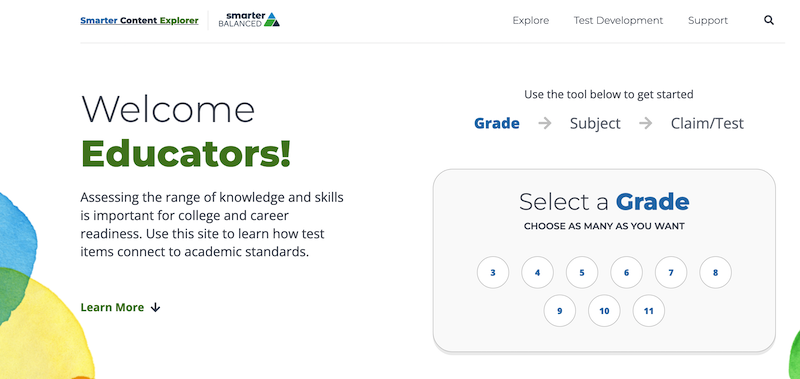
The Content Explorer helps educators look beneath the surface of an assessment. Teachers can begin with a grade and subject, then explore by assessment claim or test. The site connects the content being assessed with the standards, assessment targets, item expectations, and supporting test-development resources.
Its Test Development area also brings key materials into one place, including:
- ELA/literacy summative and interim assessment blueprints;
- the number of questions and score points associated with assessment targets;
- depth-of-knowledge information;
- ELA full-write scoring guidance;
- genre-specific Performance Task rubrics for narrative, opinion, informational, argumentative, and explanatory writing; and
- the Performance Task conventions scoring chart and other assessment specifications.
Why is this valuable for teachers?
CAASPP score reports show how students performed. The Content Explorer helps teachers understand more of the assessment design behind those results. It can help a grade-level team move from a broad score or claim result to more useful instructional questions:
- What knowledge and skills was the assessment designed to measure?
- How do those expectations connect to grade-level standards?
- What makes one student response stronger than another?
- Where do organization, evidence, elaboration, and conventions enter the scoring process?
- What kinds of writing experiences will help students demonstrate what they know?
The value is not in “teaching to the test.” It is in making the assessment’s expectations less mysterious so teachers can compare them with everyday instruction, student work, and locally used writing rubrics.
A closer look at the ELA Performance Task
The ELA Performance Task asks students to do more than select an answer. Students work with source material and produce an extended written response. That response is evaluated across multiple dimensions rather than with a single overall impression.
The official Smarter Balanced materials allow teachers to examine the full-write rubric for the relevant writing purpose. This makes it possible to see the language used at each score point and to understand how the parts of a response contribute to the score. The Content Explorer is particularly helpful here because it places the rubric alongside the broader assessment blueprint, claim-and-target structure, and Performance Task specifications.
Try this with a teaching team
- Choose the grade and English Language Arts.
- Review the relevant writing claim, targets, and Performance Task materials.
- Open the full-write rubric for the type of writing students are being asked to produce.
- Compare the score-point descriptions with samples of student writing.
- Identify one or two instructional moves that would help students produce clearer, better-supported responses.
A simpler entry point: the SDLA Performance Task rubric overview
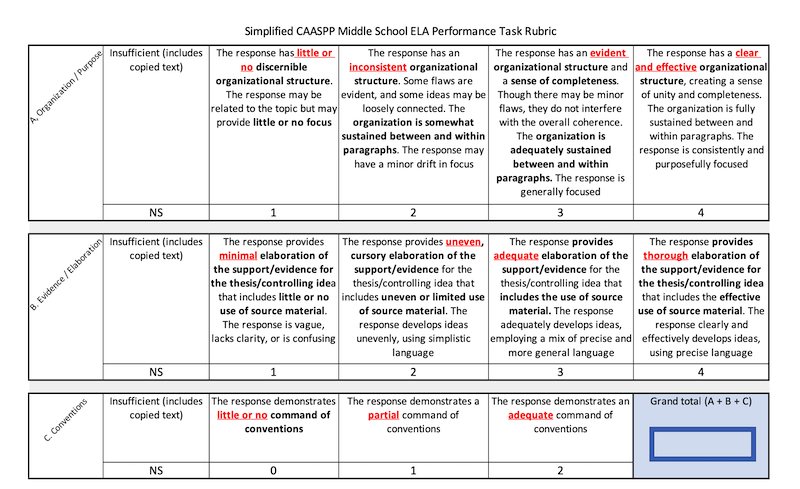
The official rubrics are the scoring authority, but they can be dense when teachers are first learning how the Performance Task is evaluated. The School Data Leadership Association’s one-page Simplified Performance Task Rubric condenses the scoring structure into a quick visual reference.
The landscape handout groups the scoring process into three sections and provides a place to combine the section scores into a grand total. Its purpose is to help teachers see the overall architecture of the rubric before working through the detailed, genre-specific descriptors in the official materials.
Use the simplified rubric as a map. Use the Smarter Balanced rubric for the complete scoring language and the expectations that apply to a particular grade and writing purpose.
See what rubric scores look like in real student writing
The Smarter Annotated Response Tool (SmART) lets teachers examine actual student Performance Task responses that have been scored and annotated by expert reviewers. Teachers can browse by grade and writing purpose, study the assigned scores for Organization/Purpose, Evidence/Elaboration, and Conventions, and read the rationale connected to specific parts of the response.
This is where an abstract rubric becomes concrete. A teaching team can compare responses with different score profiles—including examples whose three trait scores add to totals such as 5 or 8—and see why one response demonstrates stronger organization, development, or use of source material than another.
SmART can also help students see that effective writing does not mean error-free writing. Misspellings, grammar problems, weak transitions, or other convention errors may still appear in a response that demonstrates meaningful strengths in organization, purpose, evidence, and elaboration.
Practice scoring before revealing the expert score
- Select a response for the appropriate grade and writing purpose.
- Score each trait independently or with a teaching team.
- Compare your scores with the calibrated scores and annotations.
- Discuss which features of the writing had the greatest effect on each score.
A three-step path from standards to scoring
First: Understand
Visit the Content Explorer
Start with the standards, claims, targets, blueprints, and official rubrics to understand what students are expected to learn and demonstrate.
Second: Simplify
Use the one-sheet rubric
Help teachers and students understand the scoring structure—and that a response can demonstrate grade-level strengths without being perfect in every area.
Third: Calibrate
Practice with SmART
Score real student responses, compare your judgment with expert-reviewed scores, and study the annotations that explain each rubric decision.