

SDLA Compliance Resource
Submit Local-Indicator Results to the Dashboard by Cycle
The final public-reporting control that converts completed self-reflection tools and governing-board evidence into the LEA’s Dashboard local-indicator ratings and narratives.
Emergency exception and county support
Use the statutory emergency route only when its conditions are met. County technical help does not create an independent local-indicator approval.
- EC 52064.5(e)(2)(B) applies when a district board, county board or charter governing body cannot review required local-indicator data because of an emergency event covered by EC 46392(a). Review at the next governing meeting, adopt a resolution describing the event and stating the actual review date, and submit that resolution to CDE. Retain the emergency evidence, agenda, minutes, resolution and submission receipt.
- The current CDE submission channel for the emergency resolution was not independently confirmed. Verify the receiving office/instructions rather than assuming the county LCAP portal or ordinary Dashboard form accepts it.
- The county reference describes a next-meeting route after late TAMO data release. That specific route remains pending a current CDE primary-source notice; do not treat it as a general deadline extension or automatically merge it with the statutory emergency exception.
- The LEA remains responsible for measurement, public nonconsent presentation and Dashboard reporting. COE technical assistance, state-required county review of district LCAPs, and a COE’s own LEA indicators are distinct responsibilities. No separate universal COE signoff on each local indicator is established here.
Authority: EC 52064.5(e) · EC 46392(a) · CDE Local Indicator FAQs. Reviewed October 21, 2026.
Separate the 2026 and 2027 reporting cycles
The SBE local-indicator reporting standards are state requirements. The exact Dashboard submission window is CDE administrative timing. The reviewed FAQ says summer with the LCAP adoption cycle and notice through the LCFF listserv; it does not establish July 31 or August 1, 2027. Keep the 2027 dates pending. The historical 2026 dates were also not verified in the reviewed sources. Record Dashboard year, underlying data period, board-presentation date, LCAP-adoption year and upload window separately. The 2027–28 LCAP adoption meeting does not by itself establish a “2027–28 Dashboard” label. CDE Local Indicator FAQs.
Targeted conflict review completed October 21, 2026. Earlier source stamps describe the earlier review scope.
In Plain Language: When CDE opens the window, enter each applicable current self-reflection tool, the exact board/body presentation and LCAP-adoption date, and required narratives; independently review, submit, and preserve confirmation before the published close.
Why this matters
Missing the window or one performance-standard element produces “Standard Not Met” or, after repeated failure, “Not Met for Two or More Years,” which may affect differentiated-assistance eligibility.
Primary ownership
Primary owner: approved Dashboard Coordinator. Partners: LCAP/accountability lead, indicator data owners, superintendent/Main Authorizer, board office, data reviewer, communications, and charter leadership.
From completed tools to Dashboard local-indicator ratings: the SDLA ITO workflow
Entries come exactly from the approved source package, and a second person compares every screen before submission. This SDLA ITO (Input, Transformation, Output) graphic shows how CDE's window notice, the completed self-reflection tools, and the board and LCAP adoption evidence become the source package, the entry review checklist, and the submission and display verification.
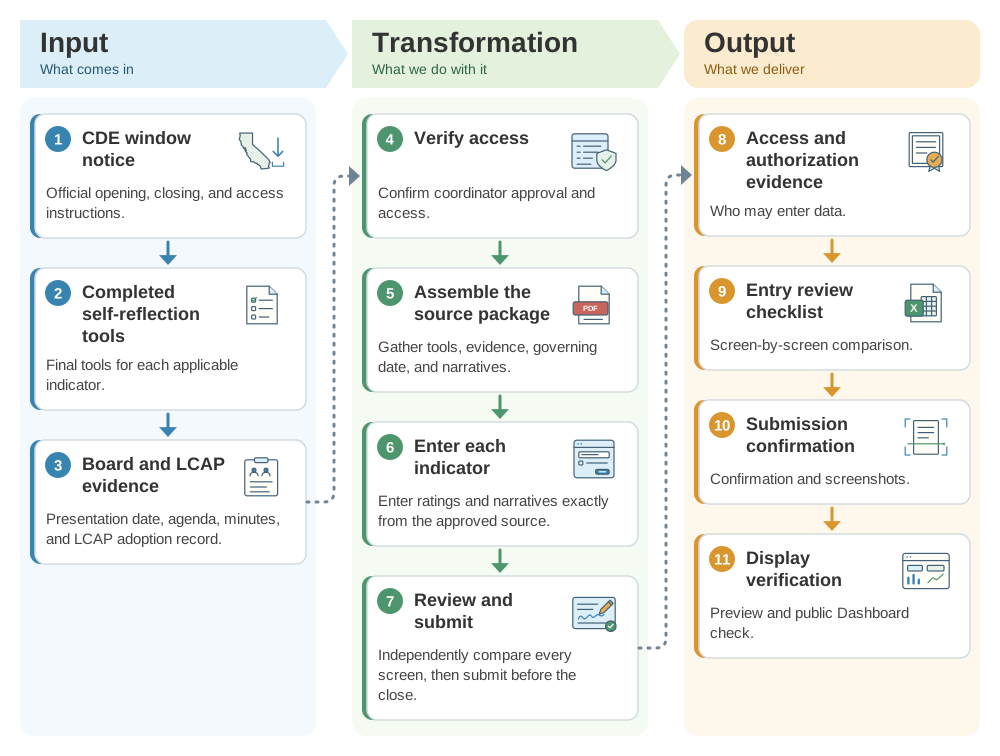
Operational workflow
- Monitor the LCFF/CDE notice and record the official opening, closing, and access instructions.
- Verify coordinator approval and assemble final tools, evidence, governing date, agenda/minutes, and LCAP adoption record.
- Enter each applicable indicator and narrative exactly from the approved source; address charter nonapplicability only through current guidance.
- Independently compare every screen with the source package, then submit before the close.
- Save confirmation/screenshots and review the preview/public Dashboard for correct display.
Implementation pathway
Evidence to retain
- CDE window notice
- Access/authorization evidence
- Final tools and board/LCAP record
- Entry review checklist
- Submission confirmation
- Preview/public display verification
Official guidance and help
- CDE Local Indicator FAQsWindow, submission, and consequences
- CDE Local IndicatorsCurrent tools and standards
- CDE Dashboard Technical GuideReporting/display context
- myCDEconnectOfficial access system
Source review completed August 30, 2026. Verify current CDE, governing, Dashboard, school-plan, SARC, safety, instructional-materials, local-calendar, and legal instructions before acting.