



SDLA Compliance Resource
Complete the IDEA Excess Cost Calculation
An implementation guide for demonstrating that the LEA spent at least its average per-pupil amount on students with disabilities before using IDEA Part B funds, and submitting the calculation to the SELPA or county office.
In Plain Language: Federal special-education funds may only pay the excess cost of educating students with disabilities. Each year the LEA must show that it first spent at least its average per-student amount (calculated separately for elementary and secondary students) from non-IDEA funds. The calculation uses prior-year actual expenditures, so it is usually completed with unaudited actuals and submitted to the SELPA or county office.
Why this matters
Failing the excess cost test means IDEA funds supplanted general funds, which is a federal compliance finding that can require repayment. The calculation also feeds maintenance-of-effort reporting.
Joint ownership
District: fiscal services and special-education fiscal staff prepare the calculation. SELPA: collects, reviews, and coordinates the due date. County office: may collect it with year-end reports. Auditor: may test it in the federal single audit.
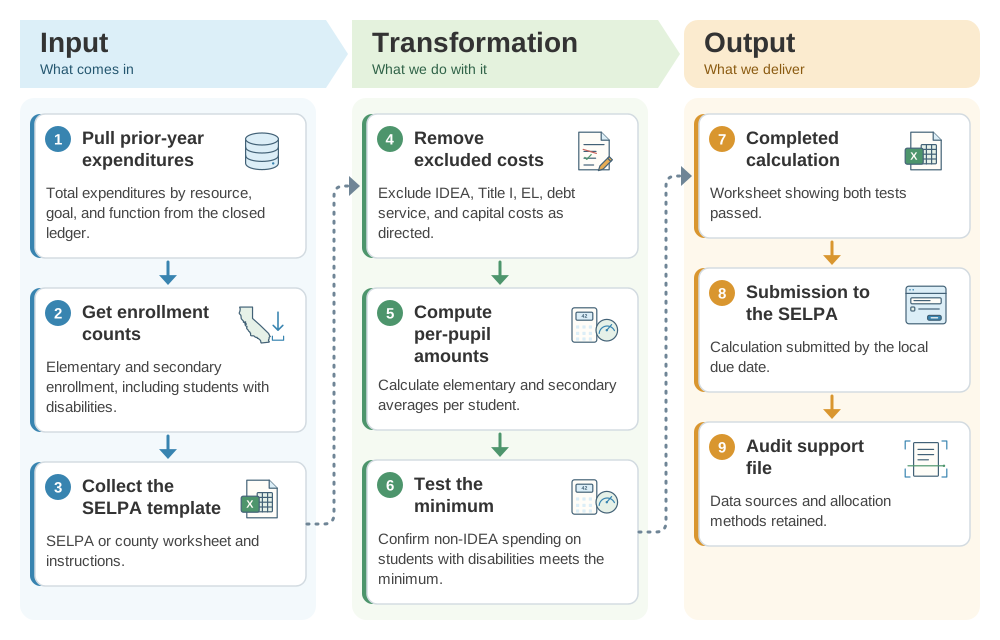
From prior-year expenditures to a passing excess cost calculation: the SDLA ITO workflow
The excess cost calculation proves federal funds supplemented, not replaced, local spending. This SDLA ITO (Input, Transformation, Output) graphic shows how the inputs become the outputs in 9 steps.
Implementation workflow
- July–AugustClose and pull data.Extract prior-year expenditures and enrollment after year-end close.
- AugustCalculate.Complete the elementary and secondary tests in the SELPA template.
- Before the local due dateReview.Resolve any shortfall and document allocation methods.
- SELPA/COE due dateSubmit.Send the calculation to the SELPA or county office.
Excess cost checklist
- Elementary and secondary calculations prepared separately.
- Excluded costs removed consistently with the template.
- Enrollment counts match CALPADS.
- Shortfall, if any, escalated before submission.
- Supporting data retained for the single audit.
Official guidance and help
- 34 CFR 300.202Use of IDEA funds for excess costs.
- 34 CFR 300.16Definition of excess costs.
- CDE Special EducationState special-education guidance and contacts.
Source review completed October 25, 2026. Verify the current template and due date with your SELPA, which sets the local process.