



SDLA Compliance Resource
Monitor School Nutrition Net Cash Resources
An implementation guide for calculating the cafeteria fund's net cash resources each year, comparing them with the allowed limit, and planning spending when the limit is exceeded.
In Plain Language: Federal rules require the cafeteria fund to be run on a nonprofit basis. Its net cash resources (cash and cash-equivalents available to the program, less payables) may not exceed the allowed limit. Federal rules say three months of average expenditures unless the state approves more; CDE raised California's limit to six months. Exceeding it requires a plan to spend the excess on the program.
Why this matters
Excess balances are a finding in CDE's administrative review and must be spent down on allowable food-service costs. Too little cash is also a warning sign for the general fund.
Joint ownership
District: nutrition services director and fiscal services. CDE Nutrition Services Division: reviews during administrative reviews.
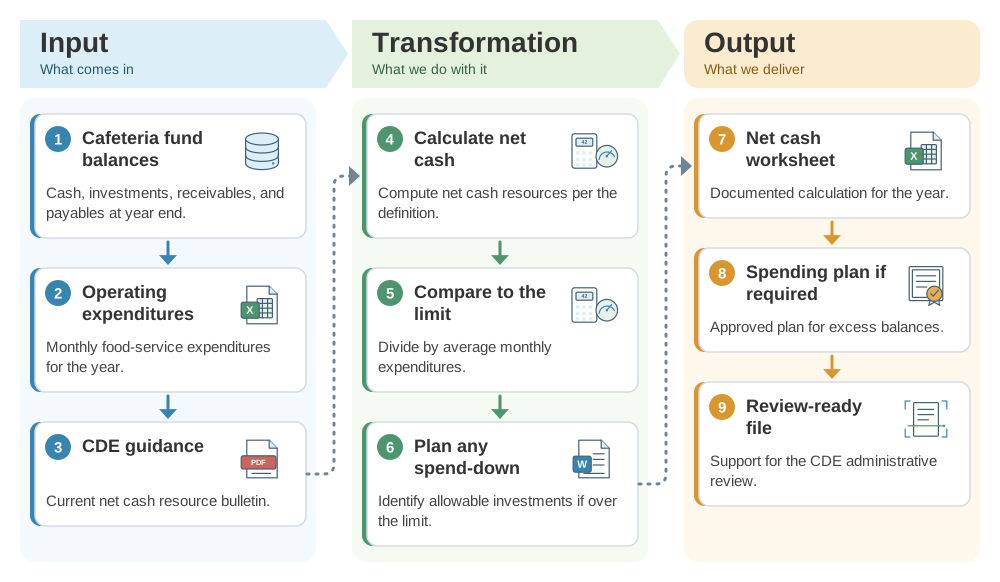
From cafeteria fund balances to a net cash resource determination: the SDLA ITO workflow
This workflow checks the cafeteria fund against the nonprofit limit every year. This SDLA ITO (Input, Transformation, Output) graphic shows how the inputs become the outputs in 9 steps.
Implementation workflow
- Year-end closePull balances.Extract cafeteria fund balances and expenditures.
- With unaudited actualsCalculate.Compute months of net cash resources.
- If over the limitPlan.Adopt a spending plan for allowable program improvements.
- During reviewsProvide support.Share the worksheet with CDE reviewers.
Net cash resources checklist
- Net cash calculated with the current definition.
- Compared with the six-month California limit.
- Spending plan adopted if over the limit.
- Worksheet retained for the administrative review.
Official guidance and help
- CDE Management Bulletin SNP-04-2022California net cash resource limit.
- 7 CFR 210.14Federal resource management requirements.
Source review completed October 25, 2026. Verify that SNP-04-2022 remains current before relying on the six-month limit.