

SDLA Compliance Resource
Post the Approved LCAP Prominently on the LEA Homepage
An operational guide to the public posting step in the 2026–27 LCAP accountability cycle.
Website posting does not establish Dashboard upload
EC 52065(c) separately requires posting the current LCAP on the Dashboard. Keep the public website, reviewer submission and Dashboard upload records separate. The exact September 14–October 9, 2026 upload window is not verified here as a CDE-issued statewide window. Dashboard upload obligation, entity pathways and pending window.
Targeted conflict review completed October 21, 2026. Earlier source stamps describe the earlier review scope.
In Plain Language: Publish the approved LCAP package through a prominent homepage link that families and community members can find without knowing the district’s internal department structure.
Post the Federal Addendum on the LCAP webpage
For an LEA with an applicable LCAP Federal Addendum, post the addendum on the same webpage as the LCAP, including locally adopted revisions to the CDE/SBE-approved plan. CDE identifies EC 52065 and 47606.5(i) as the posting authorities.
Recommended publication check: identify the latest approved/adopted versions, place the current addendum and complete LCAP/BOP package together, label dates clearly, test both links without administrator access and retain the public URLs. Annual local review/revision does not by itself require resubmission of a previously approved addendum to CDE.
Coverage addition reviewed October 21, 2026.
Why this matters
A file technically present somewhere on a website is not the same as a prominent, usable public posting. The online copy must remain accessible, current, and complete.
Primary ownership
Primary owner: communications/web owner with the LCAP lead. Partners: superintendent’s office, business services, accessibility lead, language-access staff, and records staff.
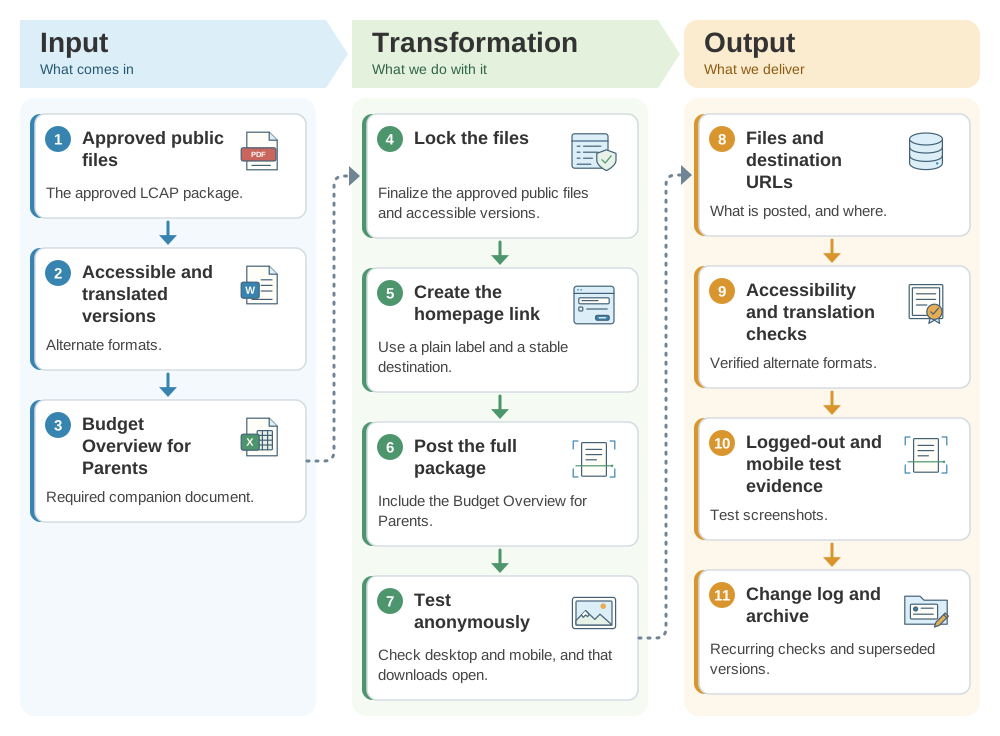
From the approved LCAP to a findable homepage posting: the SDLA ITO workflow
Families should reach the LCAP without knowing how the district is organized. This SDLA ITO (Input, Transformation, Output) graphic shows how the approved LCAP package, its accessible versions, and the Budget Overview for Parents become the approved files and URLs, the test evidence, and the change log and archive.
Operational workflow
- Lock the approved public files and accessible versions.
- Create a plainly labeled homepage link and stable destination.
- Post the full package, including the Budget Overview for Parents.
- Test anonymously on desktop/mobile and verify downloads open correctly.
- Assign recurring link, accessibility, and superseded-version checks.
Implementation pathway
Evidence to retain
- Approved public files
- Homepage and destination URLs
- Accessibility and translation checks
- Logged-out/mobile test evidence
- Change log and archive record
Official guidance and help
- CDE Local Control and Accountability PlanCurrent templates, instructions, and resources
- CDE LCFF Frequently Asked QuestionsState review and approval context
- Education Code section 52062District consultation, hearing, adoption, submission, and posting
- Education Code section 52070County review, clarification, recommendations, and approval
Source review completed August 30, 2026. Verify the current CDE template, instructions, statutory dates, reviewing-authority procedures, and local meeting calendar before acting.