



SDLA Compliance Resource
Provide Forest Reserve Enrollment Data to the County Office
An implementation guide for districts in or adjacent to a national forest to report the enrollment data the county superintendent uses to apportion federal forest reserve funds.
In Plain Language: Federal payments for national forest land go to counties, and the county superintendent shares them with school districts in or next to the forest under EC 2300. To calculate each district's share, the county asks for counts (and sometimes addresses) of students who live inside the forest reserve boundary.
Why this matters
If the district does not respond, it may receive less than its share. Because the data can include student addresses, it must be handled as protected student information.
Joint ownership
District: student information or attendance office extracts the data; fiscal services submits. County office: sets the date, method, and allocation.
From student addresses to a forest reserve data submission: the SDLA ITO workflow
This workflow produces an accurate, secure count of students living within the forest reserve. This SDLA ITO (Input, Transformation, Output) graphic shows how the inputs become the outputs in 9 steps.
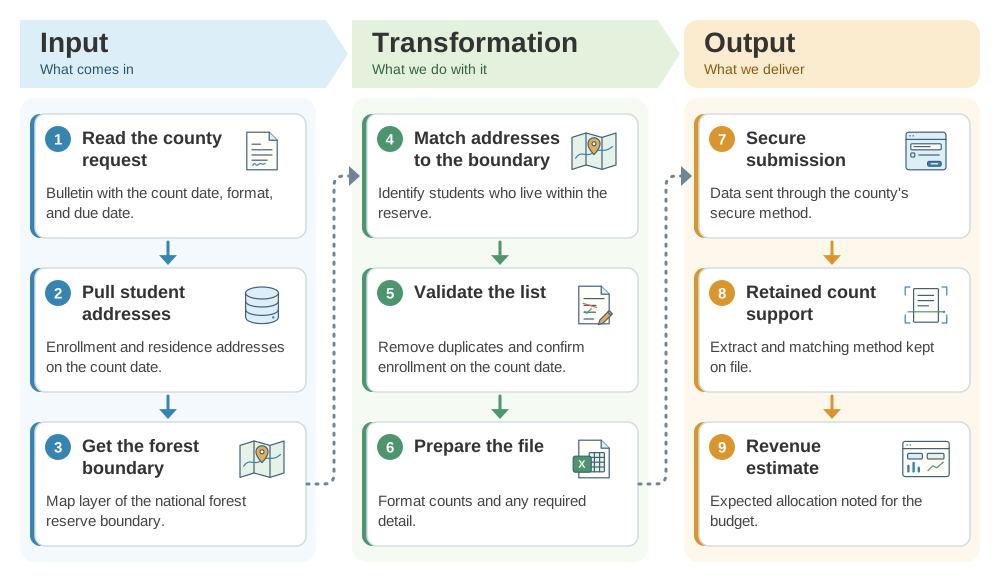
Implementation workflow
- On the county requestPlan.Confirm the count date, format, and due date.
- Count dateExtract.Pull enrollment and addresses as of the specified date.
- Before the due dateMatch and validate.Match to the boundary and review.
- County due dateSubmit securely.Send the data and retain support.
Forest reserve checklist
- County request and due date logged.
- Count date matches the county's instruction.
- Boundary matching method documented.
- Only requested fields sent through a secure channel.
Official guidance and help
- Education Code 2300Apportionment of forest reserve funds by the county superintendent.
Source review completed October 25, 2026. Verify whether your county office collects this data and its current method; this applies only to districts in or adjacent to a national forest.