
SDLA Compliance Resource
Designate and Approve a Dashboard Coordinator
The access-control step that gives a trained local official authority to enter local-indicator results and participate in Dashboard reporting and preview activities.
Authorization is separate from the reporting window
CDE allows up to two approved Dashboard Coordinators per LEA; Main and Alternate Authorizers can also report local indicators. Registration requires the applicable LEA authorizer’s approval. No independent statewide coordinator-designation deadline was established here. Set a local access-readiness target, and verify the separate CDE submission notice for the correct cycle. CDE access and submission guidance.
Targeted conflict review completed October 21, 2026. Earlier source stamps describe the earlier review scope.
In Plain Language: Have the proposed coordinator submit the myCDEconnect registration, route the approval email to the correct superintendent or charter administrator/Main Authorizer, confirm approval and access, and establish a backup before the reporting window opens.
Why this matters
Completed self-reflection tools cannot be reported if access is unresolved. Stale School Directory contacts, filtered approval email, unapproved registrations, or a single unavailable coordinator can turn completed local work into “Standard Not Met.”
Primary ownership
Primary owner: accountability/LCAP lead. Approval owner: superintendent or charter school administrator/Main Authorizer. Partners: Dashboard coordinator, data governance, IT/email security, board office, and communications.
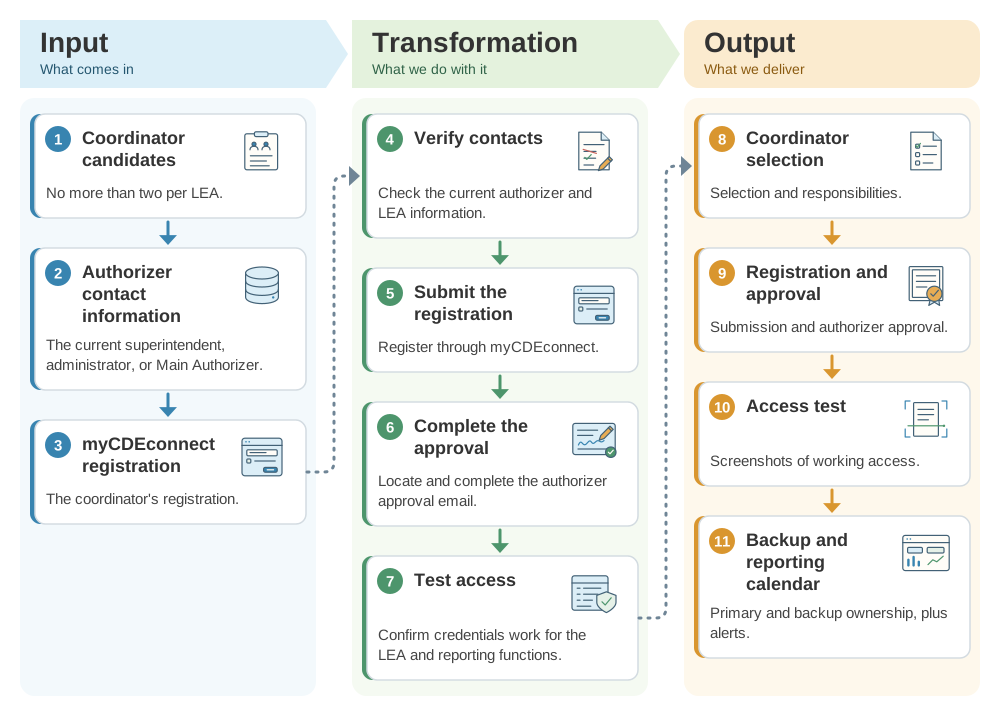
From a proposed coordinator to approved Dashboard access: the SDLA ITO workflow
The coordinator needs approved, tested access, and a backup, before the reporting window opens. This SDLA ITO (Input, Transformation, Output) graphic shows how the proposed coordinator, the authorizer's contact information, and the myCDEconnect registration become the registration and approval record, the access test, and the backup and reporting calendar.
Operational workflow
- Verify the current authorizer and LEA contact information and identify no more than two coordinators.
- Submit the Dashboard Coordinator registration through myCDEconnect.
- Locate and complete the authorizer approval; whitelist system email if necessary.
- Test credentials and confirm the coordinator can access the correct LEA and reporting functions.
- Document primary/backup ownership, source-record location, board date, and reporting-window alert process.
Implementation pathway
Evidence to retain
- Coordinator selection and responsibilities
- Registration submission
- Authorizer approval
- Access test/screenshots
- Backup and reporting calendar
- Contact/update records
Official guidance and help
- CDE Local Indicator FAQsCoordinator, approval, and reporting requirements
- CDE Local IndicatorsSelf-reflection tools and standards
- myCDEconnectOfficial access system
- California School DirectoryAuthorizer/contact verification
Source review completed August 30, 2026. Verify current CDE, governing, Dashboard, school-plan, SARC, safety, instructional-materials, local-calendar, and legal instructions before acting.