

SDLA Compliance Resource
Create and Assign LEA CAASPP Testing Windows in TOMS
A calendar-to-system control that aligns instructional days, school calendars, assessment eligibility, technology, staffing, make-ups, and state constraints.
In Plain Language: Select lawful local testing windows, enter and assign them in TOMS, and confirm each school’s dates and assessments before the state configuration deadline.
Why this matters
A window is a system control, not merely a calendar note. Incorrect dates can block testing, compress make-ups, or conflict with instructional-day rules and school calendars.
Primary ownership
Primary owner: LEA CAASPP coordinator. Partners: superintendent, sites, curriculum, technology, special education, EL staff, calendars, and communications.
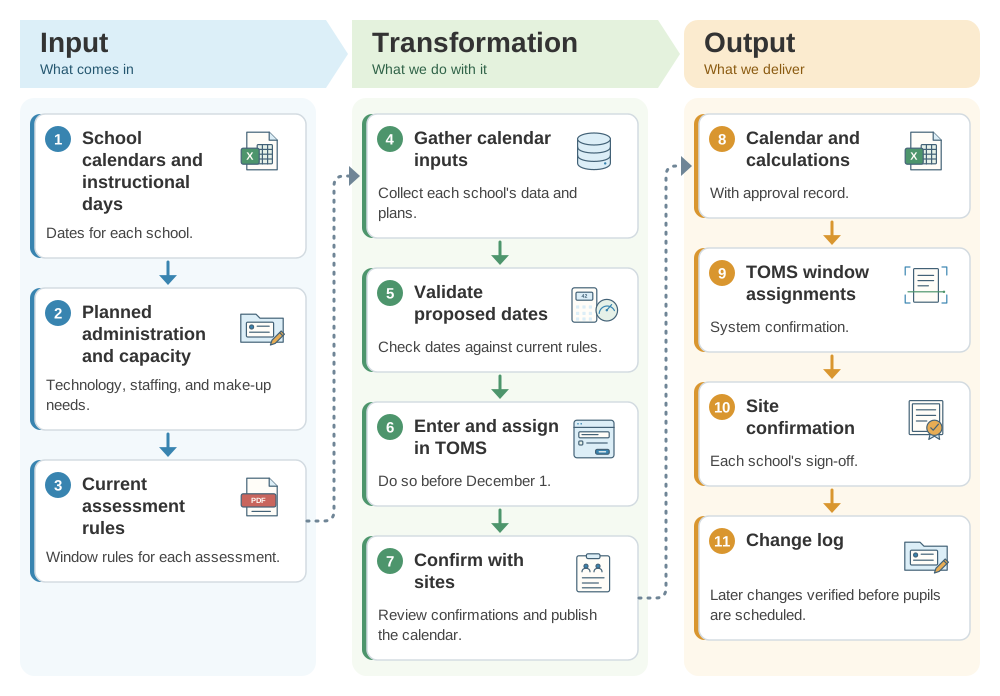
From school calendars to assigned CAASPP testing windows: the SDLA ITO workflow
Windows entered in TOMS must match each school's calendar, assessments, and the state's rules. This SDLA ITO (Input, Transformation, Output) graphic shows how school calendars, instructional-day data, technology capacity, and make-up needs become the calculations and approvals, the TOMS window assignments, and the site confirmations and change log.
Operational workflow
- Gather each school calendar, instructional-day data, planned administration, technology capacity, and make-up needs.
- Validate proposed dates against current rules for each assessment.
- Enter and assign windows in TOMS before December 1.
- Review system confirmation with each site and publish the operational calendar.
- Control later changes and verify they propagate before scheduling pupils.
Implementation pathway
Evidence to retain
- Calendar and calculations
- Approval record
- TOMS window assignments
- Site confirmation
- Change log
Official guidance and help
- TOMS ResourcesCurrent testing-window instructions
- August 2026 CAASPP CommunicationCurrent coordinator preparation
- CDE CAASPPState administration guidance
Source review completed August 30, 2026. Verify current California requirements, CAASPP and ELPAC manuals, live system status, local policy, pupil records, and final system state before acting.