



SDLA Compliance Resource
File CDTFA Use Tax Returns and Manage the Diesel Fuel Tax Exemption
An implementation guide for reporting use tax on untaxed purchases and claiming the partial diesel fuel tax exemption for student transportation.
In Plain Language: When the district buys taxable goods from an out-of-state or online seller that does not charge California tax, the district owes use tax and reports it to CDTFA on the schedule CDTFA assigns. Separately, a public school district qualifies for a partial diesel fuel tax exemption for fuel used to transport students to and from school or on school trips, claimed through exemption certificates or refund claims.
Why this matters
Unreported use tax creates liabilities with interest and penalties when CDTFA audits. Missing the diesel exemption overpays tax on a large transportation expense.
Joint ownership
District: accounts payable identifies untaxed purchases; fiscal services files; transportation tracks fuel used for students. CDTFA: assigns the filing basis and processes claims.
From purchases and fuel records to accurate CDTFA filings: the SDLA ITO workflow
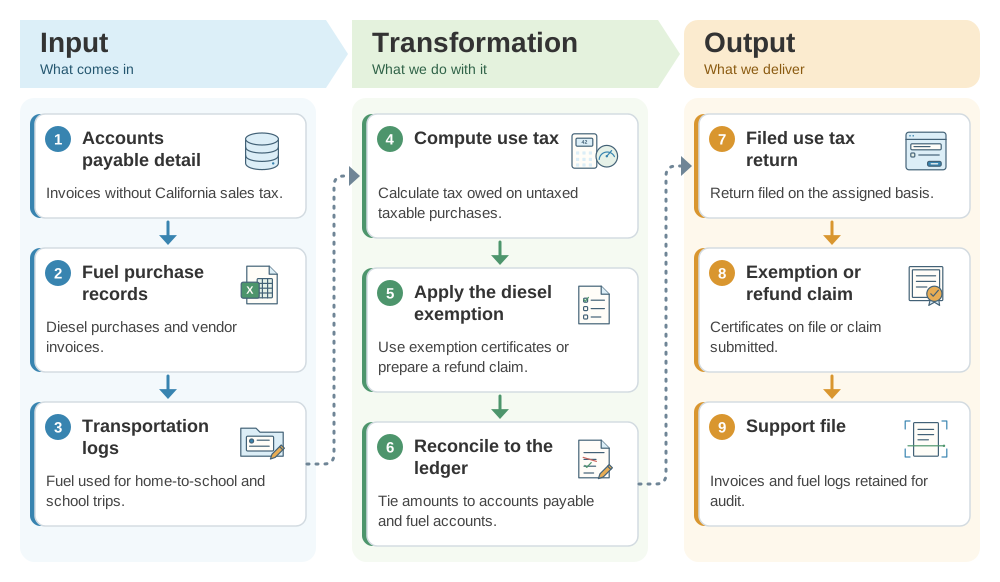
This workflow captures use tax owed and fuel tax not owed in the same annual cycle. This SDLA ITO (Input, Transformation, Output) graphic shows how the inputs become the outputs in 9 steps.
Implementation workflow
- During the yearFlag purchases.Mark invoices without California tax and track student-transport fuel.
- After the period endsCalculate.Compute use tax and the diesel exemption amount.
- By the CDTFA due dateFile.File the return and any refund claim.
- OngoingRetain records.Keep invoices and fuel logs for CDTFA review.
CDTFA filing checklist
- Filing basis and due date confirmed in the CDTFA account.
- Untaxed purchases flagged in accounts payable.
- Student-transport fuel separated from other fuel use.
- Return and claims filed with confirmations saved.
Official guidance and help
- CDTFA Sales and Use Tax Filing DatesDue dates by filing basis.
- CDTFA Diesel: Exempt Bus Operator and Government EntitySchool district diesel exemption guidance.
Source review completed October 25, 2026. Verify your CDTFA account's assigned filing basis and the current diesel exemption procedure; this page is a starting point, not tax advice.