

SDLA Compliance Resource
Reconcile CALPADS School-Program Data with CARS Before Related Submissions Close
An operational guide for aligning Title I Schoolwide Program and Targeted Assistance School status across the Consolidated Application and Reporting System, local records, and CALPADS before certification deadlines collide.
In Plain Language: CARS—the Consolidated Application and Reporting System—tells CDE which Title I schools are funded and which are authorized to operate a Schoolwide Program (SWP). CALPADS uses the certified CARS status. If the systems disagree, CALPADS may treat a school as a Targeted Assistance School (TAS), expect pupil-level Program 122 records, produce fatal errors, and block EOY 1 certification.
Why this matters
SWP and TAS are different reporting models. An SWP school generally does not submit individual Title I Program 122 records. A TAS school must submit those records for pupils receiving Title I services. The school’s local plan, board approval, CARS certification, SIS setup, CALPADS records, and certification reports must describe the same reality.
Joint ownership
Program authority: Title I/federal-programs lead. CARS owner: CARS user and LEA User Administrator. CALPADS owner: CALPADS administrator. Local source owners: SIS/program staff and school leadership. Governance evidence: board-approved SWP plan or other required authorization.
The authoritative chain
From the Title I school inventory to reconciled CARS and CALPADS records: the SDLA ITO workflow
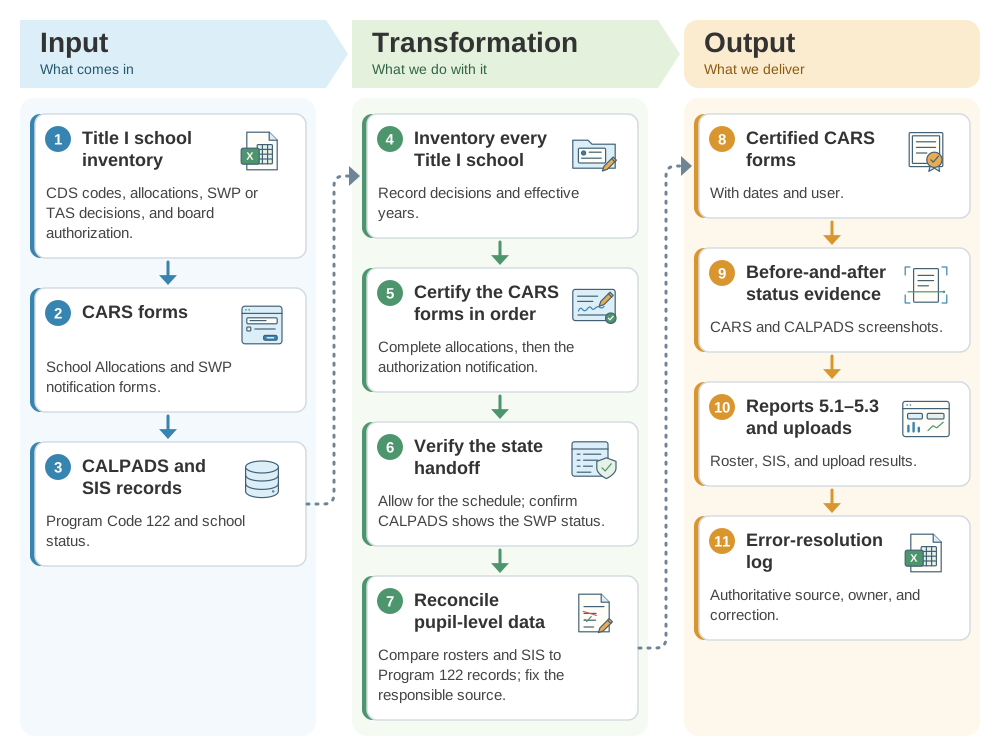
CARS decides which schools may operate a schoolwide program, so CALPADS and the SIS must match it. This SDLA ITO (Input, Transformation, Output) graphic shows how the Title I school inventory, board authorizations, and CARS and CALPADS records become the inventory and certified CARS forms, the before-and-after status evidence, and the error-resolution log.
Reconciliation workflow
- Before the CARS windowInventory every Title I school.Record CDS code, allocation, local SWP/TAS decision, board authorization, effective year, and program contact.
- During CARS data entryCertify the related forms in sequence.Complete the applicable Title I School Allocations form, then the Notification of Authorization of Schoolwide Program form for approved SWP schools.
- After CARS certificationVerify the state handoff.Allow for the published population schedule, then confirm CALPADS reflects the certified SWP status; save screenshots or exports from both systems.
- Before EOY 1Reconcile pupil-level reporting.For TAS schools, compare the service roster and SIS to Program Code 122 records. For SWP schools, investigate unexpected Program 122 expectations or records.
- Before each system closesResolve the responsible source.Correct local authorization, CARS certification, SIS records, or CALPADS submissions according to which fact is wrong; do not wait for the later system’s deadline.
If the data do not reconcile
| Mismatch | Likely check | Resolution |
|---|---|---|
| Local records say SWP; CALPADS says TAS | Board authorization, School Allocations certification, SWP Notification certification, CDS code, academic year, and nightly transfer timing. | Correct or certify CARS when its window permits; document the state handoff and verify CALPADS afterward. |
| CARS says TAS; SIS has no Program 122 pupils | Title I service roster, school program model, local program coding, and extract rules. | Program owner determines the correct pupils; SIS owner creates accurate records; CALPADS owner submits and verifies them. |
| CERT097 or related fatal errors | School SWP/TAS status and missing TAS Program 122 records. | Resolve the authoritative status or missing pupil records, post the correction, regenerate the revision, and rerun reports. |
| School absent or wrong in a form | CDS/OPUS status, CARS form applicability, allocation setup, and LEA selection. | Contact the appropriate CDE program or ConApp Support Desk; do not fabricate a local workaround. |
Where to find the CARS forms
Use the CARS Data Collection Forms Calendar to see each release, form, submission window, certification deadline, amendment window, and final close date. Use the CARS program page for login, user guidance, training, and current-year form instructions. Do not reuse dates from a prior cycle.
Evidence to retain
- Title I school inventory, CDS codes, SWP/TAS determinations, and governing-board authorization.
- Certified CARS School Allocations and SWP Notification forms with dates and user.
- Before-and-after CARS and CALPADS status evidence.
- TAS pupil service roster, SIS Program 122 records, upload results, and Reports 5.1–5.3.
- Error-resolution log identifying the authoritative source, owner, correction, and verified posted state.
- Certified ConApp, signed Certification of Assurances, and retained local file.
Official guidance and help
- CALPADS Update Flash 320CARS/CALPADS SWP and TAS alignment, timing, and report guidance.
- CARS Data Collection Forms CalendarCurrent forms and deadlines.
- CARS program pageLogin, training, instructions, and support.
- CALPADS CalendarSubmission windows, milestones, and certification deadlines.
- CALPADS CERT097 guidanceMissing Title I TAS program-record troubleshooting.
Source review completed August 30, 2026. Verify current CARS forms and dates, CALPADS deadlines, local Title I authorization, and the posted state in both systems before acting.