



SDLA Compliance Resource
File Authorized Signatures for District Orders
An implementation guide for authorizing district officers or employees to sign orders on district funds and filing verified signatures with the county superintendent.
In Plain Language: Orders (warrants) drawn on district funds must be signed by a majority of the board or by an officer or employee the board authorizes. The board must file each authorized signer's verified signature with the county superintendent. Without a current signature on file, the county will not process the order.
Why this matters
Outdated signature cards stop payroll and vendor payments when a signer leaves, and unauthorized signers are an internal-control finding. Keeping the list current is also a fraud-prevention control.
Joint ownership
District: superintendent and chief business official propose signers; the board adopts the resolution; business staff file the forms. County office: maintains the signature file and approves orders.
From a signer change to verified signatures on file: the SDLA ITO workflow
This workflow keeps the county's signature file aligned with the board's authorization. This SDLA ITO (Input, Transformation, Output) graphic shows how the inputs become the outputs in 9 steps.
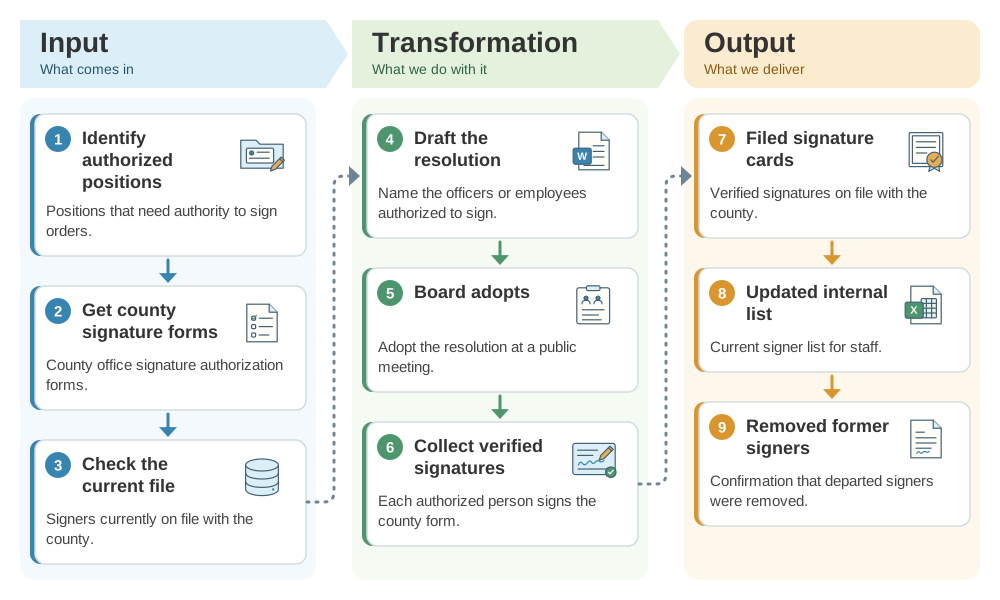
Implementation workflow
- Organizational meeting or JulyAnnual resolution.Adopt the signature authorization resolution.
- Within daysFile with the county.Submit verified signatures on the county forms.
- On any changeUpdate.Remove departed signers and add replacements immediately.
- AnnuallyReconcile.Compare the county file with the board's current authorization.
Signature authorization checklist
- Resolution names only district officers or employees.
- Verified signatures filed for every authorized person.
- Departed signers removed promptly.
- County file reconciled annually.
Official guidance and help
- Education Code 42632Who may sign orders.
- Education Code 42633Filing verified signatures with the county superintendent.
Source review completed October 25, 2026. Verify your county office's current forms; fiscally accountable districts under EC 42650 follow different procedures.