



SDLA Compliance Resource
Adopt the Gann Appropriations Limit Resolution
An implementation guide for calculating the prior-year and current-year appropriations limits, posting the documentation, adopting the resolution, and submitting the data with unaudited actuals.
In Plain Language: The state constitution (Article XIII B) caps how much tax-funded spending each local agency may appropriate. Every year the board must adopt, by resolution at a public meeting, the district's appropriations limit for the current year and recalculate the prior year's limit using actual data. The calculation is submitted to the state with the unaudited actuals.
Why this matters
The Gann limit is easy to forget because it rarely binds, but the resolution and the calculation are required every year. Missing it creates an audit and county-review finding, and an incorrect calculation can misstate the district's position if revenues approach the limit.
Joint ownership
District: chief business official and fiscal services prepare the worksheets; the superintendent agendizes; the board adopts. County office: reviews the data with unaudited actuals and forwards it to CDE.
Two limits, one resolution
| Limit | Basis | Where it goes |
|---|---|---|
| Prior year (2025–26) actual | Recalculated with actual ADA and appropriations subject to the limit. | SACS Gann worksheet with unaudited actuals. |
| Current year (2026–27) estimated | Prior-year limit adjusted for population (ADA) and per-capita income changes. | Same resolution; updated again next year with actuals. |
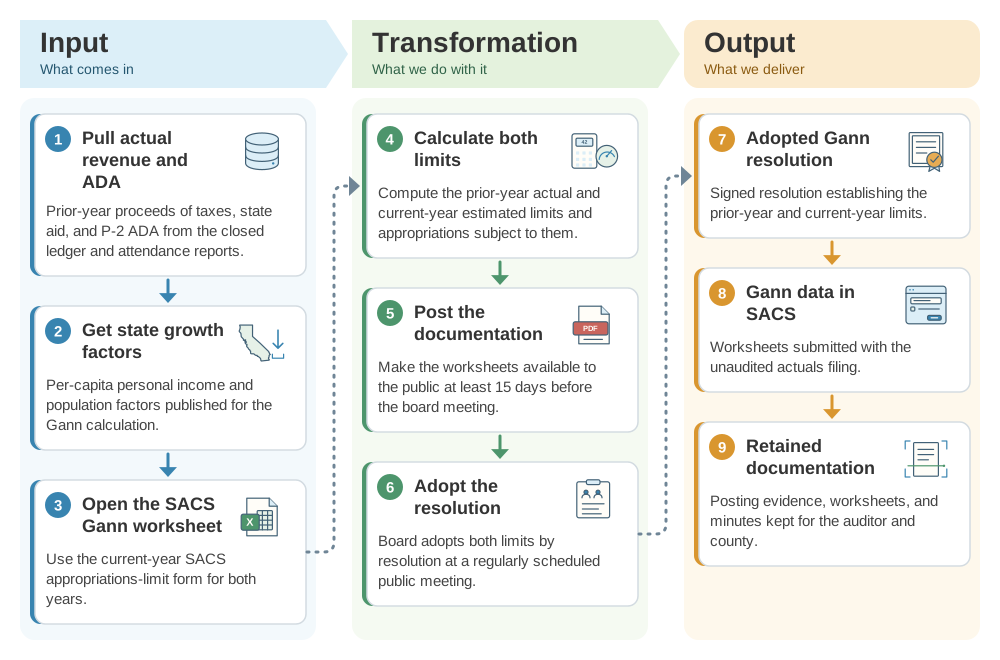
From revenue and ADA data to an adopted Gann resolution: the SDLA ITO workflow
The Gann resolution converts revenue, ADA, and state growth factors into a board-adopted spending limit. This SDLA ITO (Input, Transformation, Output) graphic shows how the inputs become the outputs in 9 steps.
Implementation workflow
- Early AugustGather data.Pull prior-year proceeds of taxes, ADA, and the state growth factors.
- Mid-AugustCalculate.Complete the SACS Gann worksheets for both years.
- At least 15 days before the meetingPost documentation.Make the calculation available to the public and note the posting date.
- By September 15Adopt the resolution.Board adopts both limits at a regular public meeting, usually with unaudited actuals.
- By September 15Submit with unaudited actuals.File the Gann data in SACS with the county office.
Gann resolution checklist
- Prior-year limit recalculated with actual data, not carried forward from the estimate.
- Current-year growth factors match the figures published for the calculation year.
- Public posting date documented at least 15 days before board action.
- Resolution adopted at a regularly scheduled meeting and retained with minutes.
- Gann worksheets included in the SACS unaudited actuals submission.
Official guidance and help
- Education Code 42132Requires the governing board to adopt the appropriations-limit resolution.
- Government Code 7910Resolution and 15-day public documentation requirement.
- 2026 Financial Reporting Calendar — DistrictGann adoption and filing dates.
Source review completed October 25, 2026. Verify the current growth factors and your county office's transmittal instructions before adoption.